Everything that turns clicks into good conversations.

This is what Video-Leads can do today, not what might come someday. For every feature you see which plan includes it, plus a real screenshot with demo data.

Area 1 of 4 · 3 features

Video & funnel

From the first video to a finished funnel: how your prospect experiences it and how easily you build it.

  • all plans
  • Branching from Growth

Player & funnel

Instead of an anonymous form, a real person talks to your prospect. The questions appear right on the video.

  • Vertical video, full screen like on social media, streamed in matching quality (HLS).
  • Story format: up to 60 seconds per video, as short as you know it from social media.
  • You put the steps together the way you need them: video, question, contact details, finish, and pages with text, list, image, or quote.
  • 11 question types: single and multiple choice, text, long text, number, stars, name, email, phone, company, and GDPR checkbox.
  • Branching by answer: every answer can get its own video and its own path (from Growth).
More details
  • The funnel asks for contact details right in the video. Anyone who reloads continues where they left off. The funnel also collects consent in the video, set to "declined" by default and with "What is shared?" for each platform.
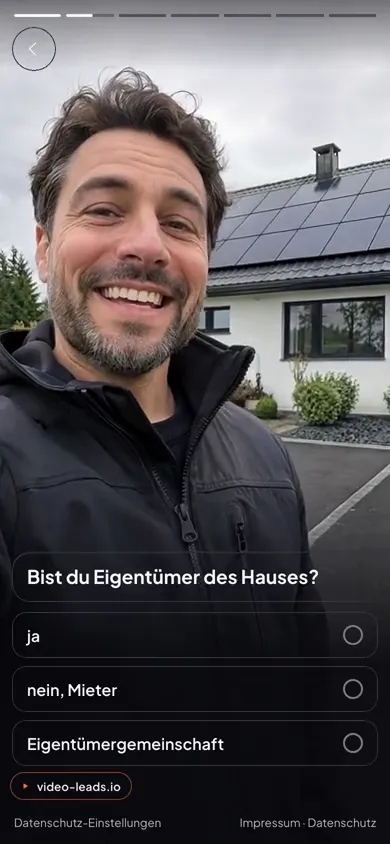
Vertical video funnel: question with answer buttons right on the video (demo data)
  • all plans
  • Videos per plan (25 / 150 / 1,000), up to 60 s each

Captions & questions from the video

Most people watch without sound. Your video still gets understood, and it even helps you find the right questions.

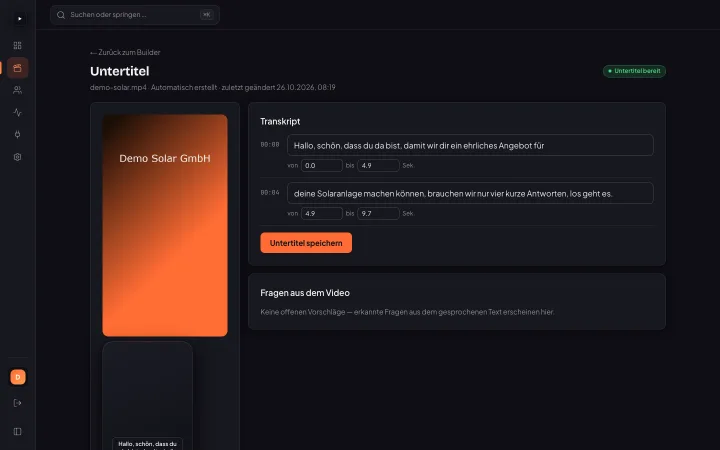
  • Captions are created automatically with Whisper on our own server, with no cloud AI at all.
  • You can edit every line and adapt the style to your brand.
  • Video-Leads detects questions in your video and suggests them as funnel questions.
  • The transcripts stay on the server.
Caption editor with editable lines (demo data)
  • all plans

Builder

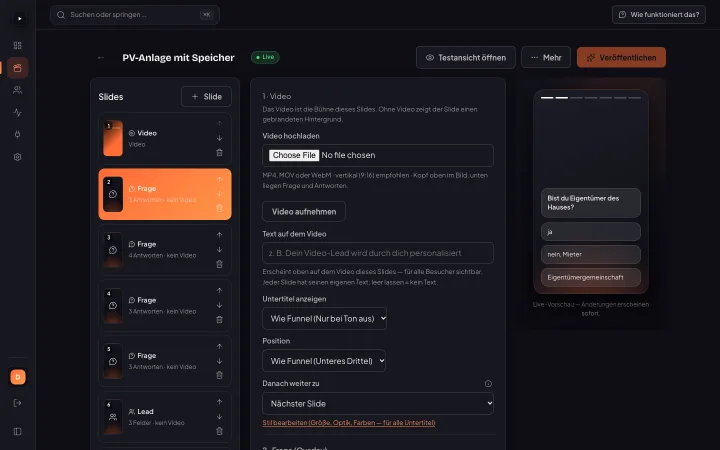
Your first funnel is ready without an agency and without a form builder. At every step you see how it looks.

  • Upload a video or record it right in the browser if your browser supports it. Otherwise, just upload the file.
  • In the slide editor you set the question over the video, the points per answer, and "Then continue to".
  • Preview and test view, and everything saves itself. You can duplicate, pause, and move funnels.
  • A "Ready to publish" checklist, a guide, and an onboarding assistant accompany you through the start.
Builder: funnel steps on the left, preview on the right (demo data)

Area 2 of 4 · 4 features

Leads & sales

What happens after the funnel: score, lead list, and a team that knows who to call first.

  • all plans

Scoring & expected value

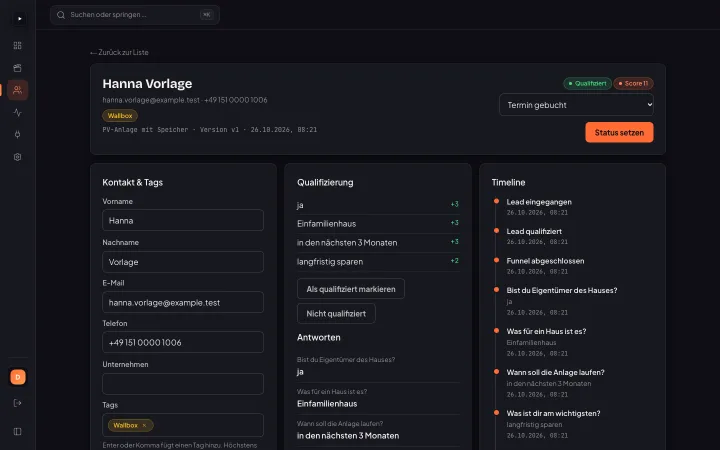
You decide which answers count. Every lead gets a score, and you know who to call first.

  • Points per answer and a threshold from which a lead counts as "qualified".
  • The server calculates the status (qualified, not qualified, or open), not the browser.
  • You can override it by hand at any time.
  • Expected value: deal value × close rate. This shows you roughly what a lead is worth.
Lead detail with answers, score, and status (demo data)
  • all plans
  • Exports 20 / 200 / 2,000 per month (Starter / Growth / Scale)

Leads

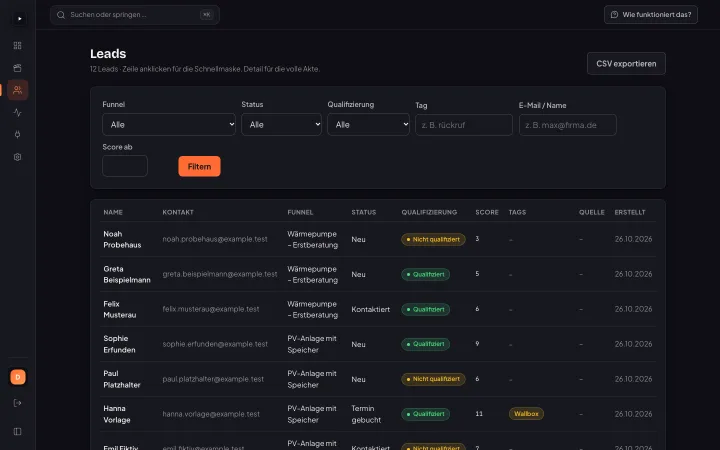
All inquiries in one place, with answers, score, and sales status. No more scraps of paper or spreadsheets.

  • Lead list with filters for funnel, status, qualification, minimum score, tag, and search.
  • The lead detail shows answers, the path through the funnel, timeline, source, consent, and notes.
  • Status from New through Contacted and Appointment to Won or Lost, with deal value.
  • Export as CSV or JSON.
  • Email notification for new leads: just a notice and a link, no lead data in the email. Additional recipients with white label.
Lead list with score, status, and filters (demo data)
  • all plans

Appointments & calendar

A good lead becomes a booked appointment, without you chasing anyone by phone.

  • Connect your Google Calendar or Microsoft 365, in every plan.
  • Callback entry: for every new or every qualified lead, Video-Leads adds a callback to your calendar, with name, score, and a link to the lead.
  • Direct booking: at the end of the funnel, your prospect picks a free slot from your calendar.
  • Contact details appear in the appointment only if you explicitly turn that on.
  • You can disconnect at any time. We remove the appointments Video-Leads created when you do.
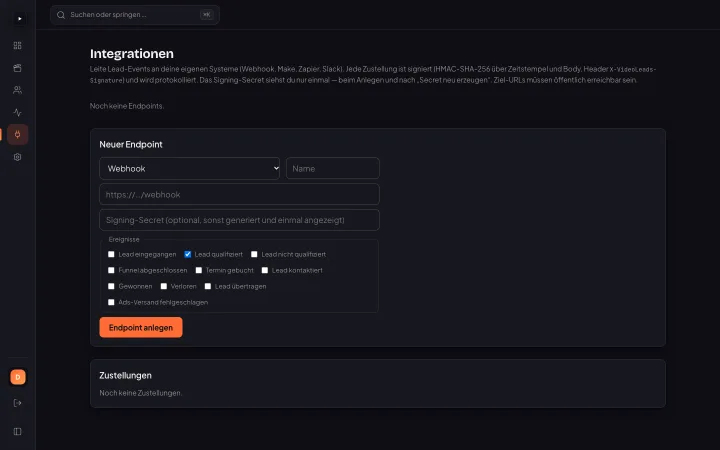
Integrations with webhooks and delivery log (demo data)
  • all plans
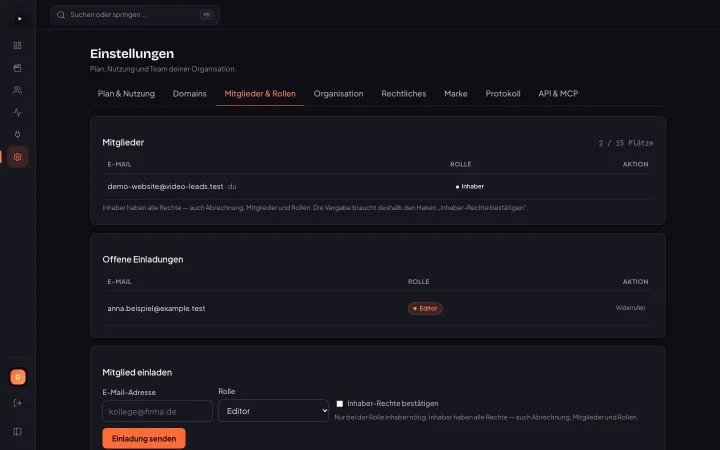
  • Starter 1 user, Growth 3, Scale 5 team members
  • +1 team member in every plan: €9 per month, cancel anytime, plus VAT

Team & roles

Everyone on the team sees and can do exactly what they need. No more and no less.

  • 4 roles: owner, admin, editor, viewer.
  • Invite, change role, remove.
  • Two-factor authentication required for owners, passkey recommended.
  • Our support only looks in when you allow it: limited to 24 or 72 hours and read-only.
"Members" settings with roles (demo data)

Area 3 of 4 · 4 features

Marketing & data

Signals for your ads, numbers for your funnels, and a look that matches your brand.

  • from Growth
  • 3 platforms (Growth) · 6 (Scale)

Ad signals

Your ads learn who is really interested, not just who clicked.

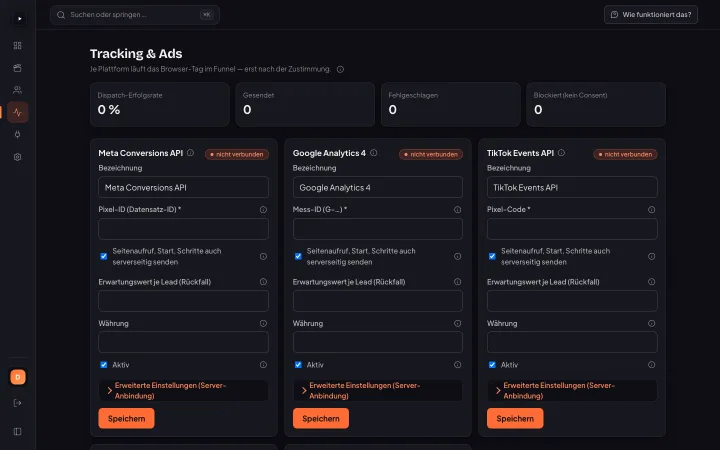
  • 6 platforms are supported: Meta (Conversions API), GA4, TikTok (Events API), Google Ads, and ChatGPT Ads (OpenAI) via server-side sending, Microsoft Ads via browser tag. In Growth you connect up to 3 of them at once, in Scale up to 6.
  • The browser pixel fires only after consent and with the same event ID as the server-side sending, so nothing is counted twice.
  • Consent is recorded for every send. A withdrawal also stops sends that are still waiting.
  • Low-data mode for healthcare providers: no contact data matching, no visitor identifier of our own.
  • A won deal goes back as a conversion with its value. On the "Tracking & Ads" page you see, with a log and a test event, which events go where.
"Tracking & Ads" page with platforms and events (demo data)
  • all plans

Analytics

You see where visitors drop off and which funnel brings you deals in the end.

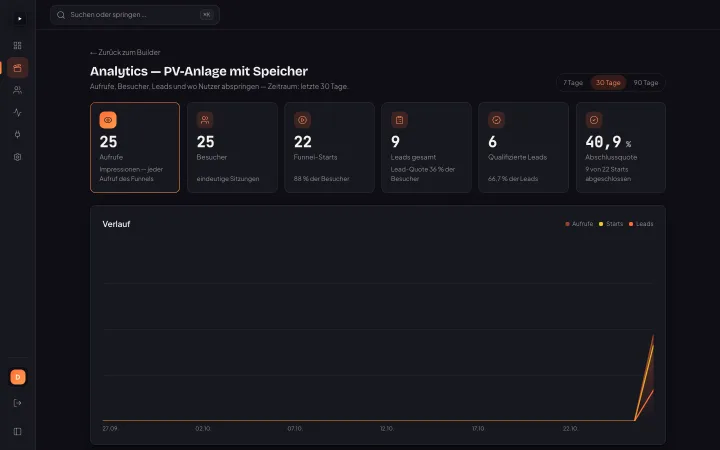
  • Dashboard with lead trend, funnel chart, key figures, and funnel ranking.
  • Per funnel: conversion chart and drop-offs per step.
  • "From lead to deal": the whole path from the first click to the won deal.
Funnel analytics: conversion chart and drop-offs per step (demo data)
  • all plans
  • one custom domain per funnel

Embedding & custom domain

Your funnel runs where your customers are: in the ad, in your bio, or on your website.

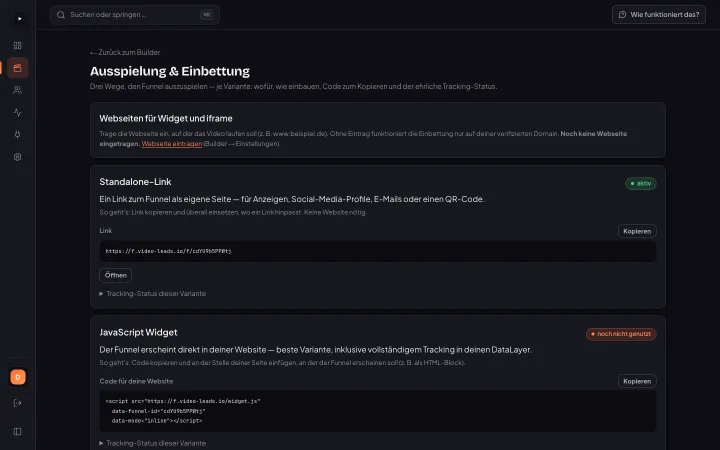
  • Widget for your website: inline, as a popup, full screen, or via button.
  • An iframe bridge passes consent and the dataLayer on to your page.
  • Direct link /f/… for ads and bio.
  • Custom domain per funnel, with DNS instructions.
Embedding: widget types, direct link, and custom domain (demo data)
  • included in Scale and Enterprise
  • for Starter and Growth as an add-on (€39 per month, cancel anytime, plus VAT)
  • Badge can be hidden from Growth

White label

Your funnel looks like your brand or like your customer's.

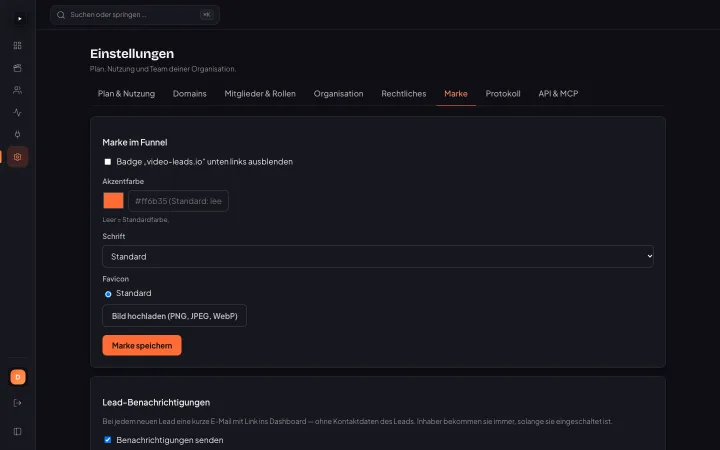
  • Your own accent color, font, and favicon.
  • Your own sender name and reply address in the lead email.
  • Additional recipients for the lead notification.
  • Video-Leads badge can be hidden in the player: from Growth, in Starter with the add-on.
"Brand" settings: color, font, and sender (demo data)

Area 4 of 4 · 3 features

Technology & security

Connections to your tools and how we protect your customers' data.

  • from Scale

Webhooks & automations

New leads land automatically where your team already works.

  • Signed webhooks with test, "resend", and a delivery log.
  • 10 event types.
  • Connection to Make, Zapier, and Slack (incoming webhook). Other tools such as n8n through the general webhook.
Integrations with webhooks and delivery log (demo data)
  • all plans

API & MCP with Claude

You build and maintain funnels in conversation with Claude Code, or connect your own tools through the API.

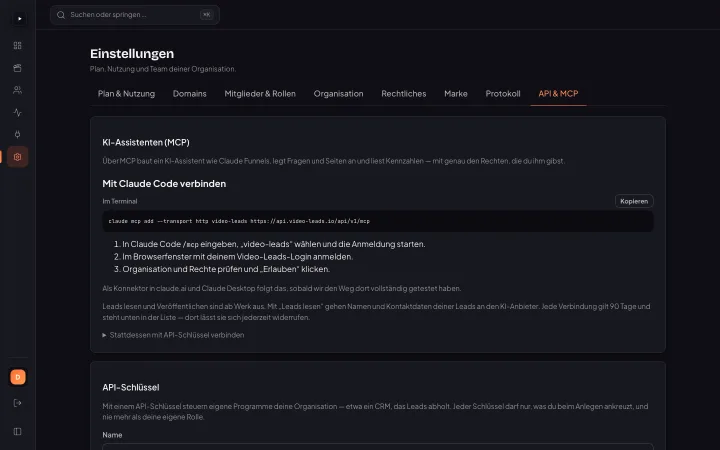
  • Claude gets 18 tools through a remote MCP endpoint: create and read funnels, steps and pages, questions with points and jump targets, read leads and key figures, upload video or images.
  • You connect Claude Code through a login approval (owners only, with two-factor) or with an API key.
  • Nothing goes live without your confirmation. Reading leads and publishing are off by default and can be enabled separately.
  • API keys with selectable permissions and an expiry date, revocable at any time. Each key shows its last-used date. Only a hash is stored.
  • Needed once in the dashboard: legal notice, privacy policy, and tracking mode.
"API & MCP" settings: access for Claude Code (demo data)
  • all plans

Security

Your customers' inquiries sit on servers in Germany, strictly separated from all other organizations.

  • Servers in Germany (Hetzner, Nuremberg and Falkenstein).
  • Tenant separation directly in the database (Postgres row-level security).
  • Encrypted transfer (TLS), media stored encrypted (AES-256-GCM).
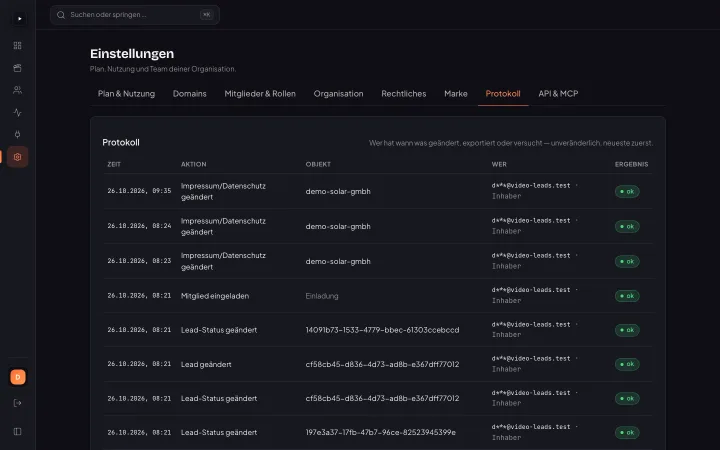
  • Audit log with hash chain, full export, deletion of leads and account.

Everything about security & privacy

"Log" settings: audit log with hash chain (demo data)

See it with your own video.

14 days free, no credit card. Missing something? Tell us through the contact form, and you get an answer within one business day.